Note on older research: This article was published before 2022. The technical breakdown remains accurate, though external links or tools mentioned may have changed.
Sometimes when you are reading tons and tons of log of malware analysis, you are not expecting that some little changes could be in fact impactful.
I paid the price when I was analyzing a supposed Arkei malware. my Yara rule at that time was supposed to trigger this malware, but after some reversing, I realized that I was confronted with something different. Some strings linked to Arkei signature was deleted and a new one appeared with the string "Vidar", there are also some other tweaks in the in-depth analysis that proves there are some differences (but small), but all the rest was totally identical to Arkei.
The malware is written in C++, seems to have started activities at the beginning of October 2018 and have all the kind of classic features of stealers:
Searching for specific documents
Stealing ID from cookie browsers
Stealing browser histories (also from tor browser)
Stealing wallets
Stealing data from 2FA software
Grabbing message from messenger software
Screenshot
Loader settings
Telegram notifications (on server-side)
Get a complete snapshot of all information of the computer victim
Sold with a range of 250-700$, this stealer on shop/forums and when people buy it, they have access to a C2 Shop portal where they are able to generate their own payloads. So there is no management on their side. Also, domains who leads to the C2/Shop are changed every 4 days.
For this in-depth analysis, I will inspect the 4.1 version of Vidar, take an overview of the admin panel, catching the differences with Arkei.
Basic Countries by-passing
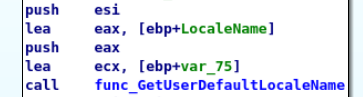
So first of all, we have some classic pattern to quit the program if the victim machines are configured in some language with the help of GetUserDefaultLocaleName. This is one of the easy tricks to check if the malware is not infected users from specific countries.
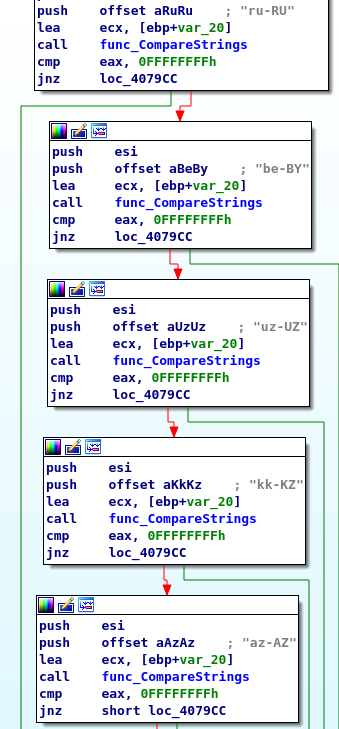
As explained in the MSDN, A "locale" is a collection of language-related user preference information represented as a list of values, the stealer will check if the language is corresponding with the list of countries that mentioned below.
With a few seconds of searching on google, it's easy to understand which countries are behind the locale names :
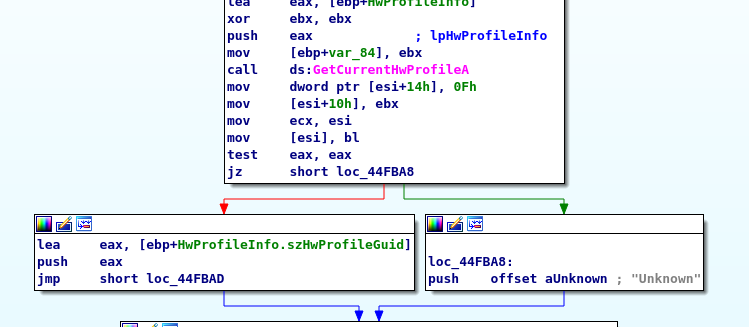
The mutant string generated by Vidar is unique for each victim, but simple to understand how it is generated. This is just a concatenation of two strings :
Hardware Profile ID
GetCurrentHwProfileA is used to retrieve the current hardware profile of the computer with the value of szHwProfileGuid. If it fails, it will return "Unknown" here.
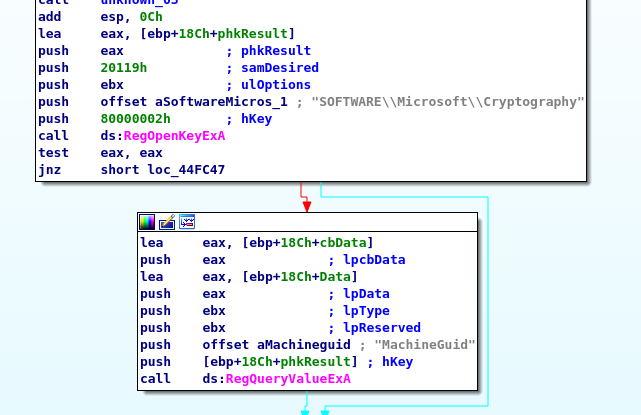
The Machine GUID
With the help of RegOpenKeyExA, the value of the registry key is fetched:
This is the UUID created by Windows during the installation of the operating system.
When it's done, the mutex is created, just like this :
String setup
When Vidar is entering in the main function, it needs to store some required strings to be able to work properly for some further steps.
All the RVA address of each string are stored in the .data section. The malware will go there to access to the requested string.
This is a trick to slow down the static analysis of the malware, but this is really easy to surpass :)
C2 Domain & Profile ID
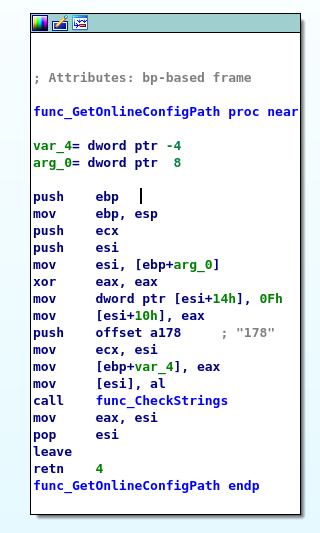
When the malware is generated by the builder on the customer area. A unique ID is hardcoded into it. When Vidar will request this value on the malicious domain, it will retrieve the corresponding profile that the threat actor wants to grab/steal into the victim machine.
So on this case, this the profile ID is "178". If there is no config on the malware, the profile ID "1" is hardcoded into it.
The C2 domain is a simple XORed string, the key is directly put into the XOR function to decrypt the data.
And decrypted it's in fact "newagenias.com"
Configs are possible to be extracted easily with the script izanami.py on my GitHub repository.
How to understand the config format
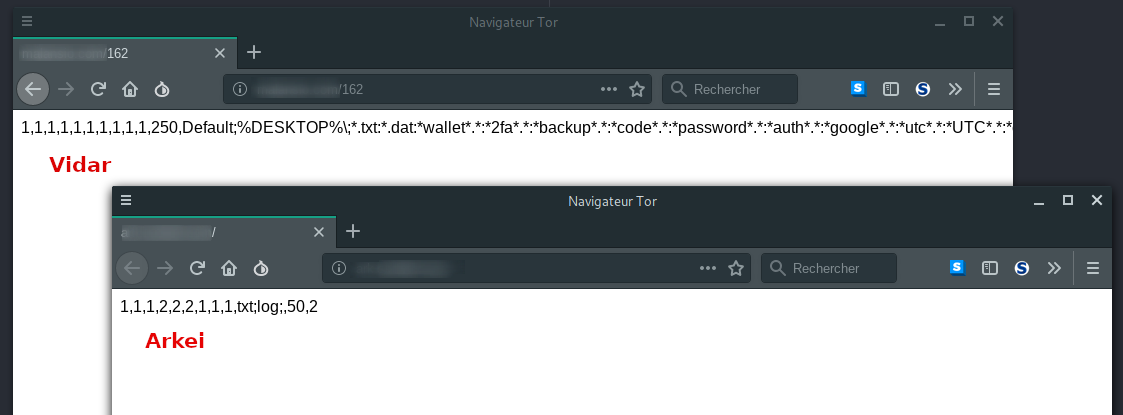
For example, this is default configuration the malware could get from the C2 :
1,1,1,1,1,1,1,1,1,1,250,Default;%DESKTOP%\;*.txt:*.dat:*wallet*.*:*2fa*.*:*backup*.*:*code*.*:*password*.*:*auth*.*:*google*.*:*utc*.*:*UTC*.*:*crypt*.*:*key*.*;50;true;movies:music:mp3;
Each part have the ";" in delimiter, so let's dig into it
First part
1
Saved password
1
Cookies / AutoFill
1
Wallet
1
Internet History
1
??? - Supposed to be Skype (not implemented)
1
??? - Supposed to be Steam (not implemented)
1
Telegram
1
Screenshot
1
Grabber
1
???
250
Max Size (kb)
Default
Name of the profile (also used for archive file into the files repository)
Second part
%DESKTOP %
Selected folder repository where the grabber feature will search recursively (or not) some selected data
movies:music:mp3;
This is the exception part, the grabber will avoid those strings if it matches in the files searched recursively in the specific wanted folder.
The setup is quite a mess if we are looking into the code. each option is stored into a byte or dword variable.
Folder generation
To summarize all kind of possibles files/folders that will be generated for the malicious repository is in fact pretty simple :
\\files                   <- Master folder
\\files\\Autofill         <- Auto-Fill files
\\files\\CC               <- Credit Cards
\\files\\Cookies          <- Cookies
\\files\\Downloads        <- Downloaded data history from browsers
\\files\\Files            <- Profile configs (Archives)
\\files\\History          <- Browser histories
\\files\\Soft             <- Master folder for targeted softwares
\\files\\Soft\\Authy      <- 2FA software
\\files\\Telegram         <- Telegram messages
\\files\\Wallets          <- Cryptomining Wallets
Generalist files
\\files\screenshot.jpg     <- Actual screenshot of the screen
\\files\passwords.txt      <- Passwords consolidated all at once
\\files\\information.txt   <- Snapshot of the computer setup
Libraries necessary to grab some data
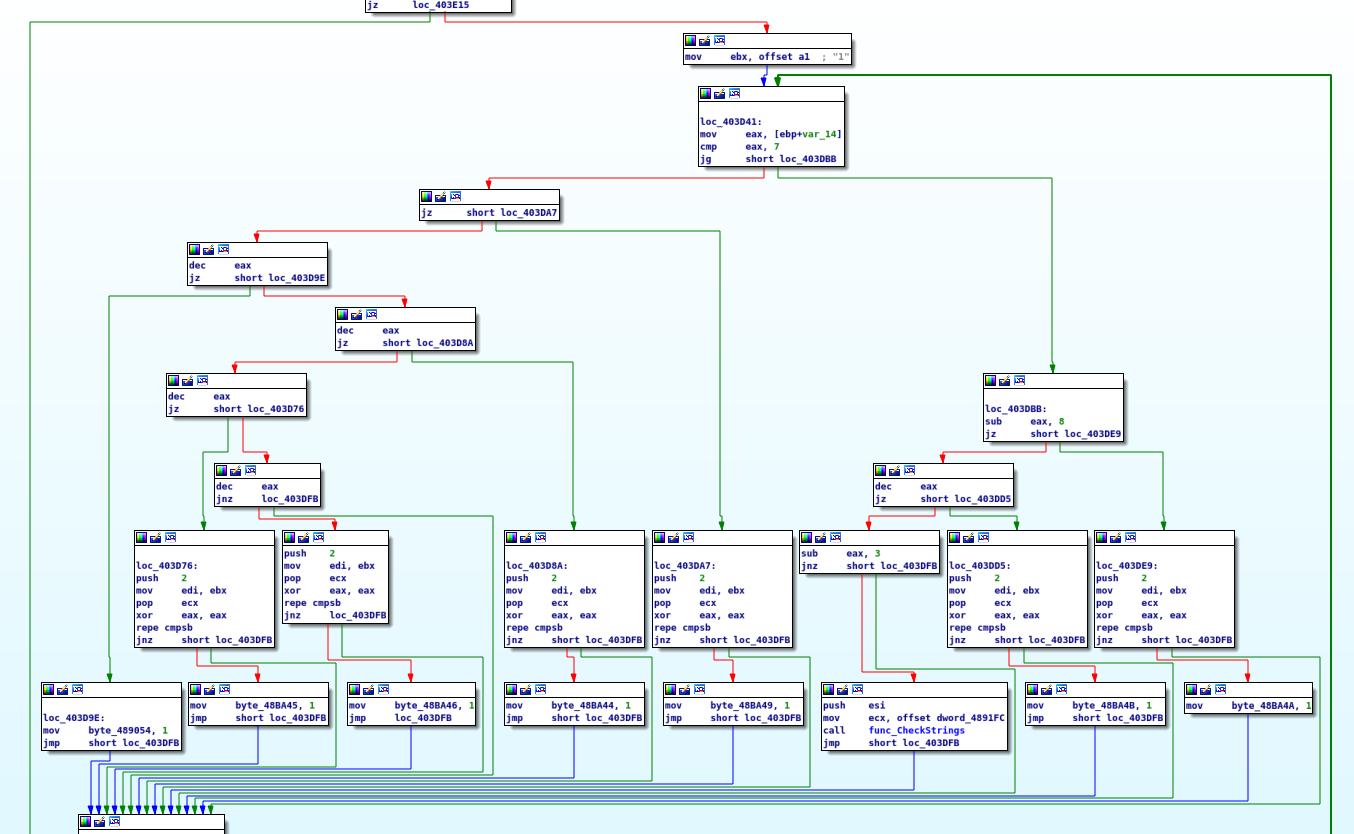
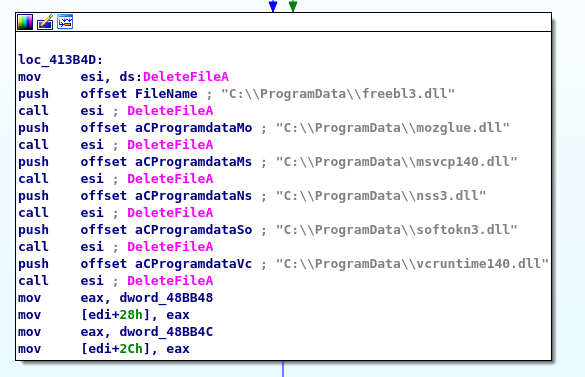
Something that I love when I read some malware specs, it's when they said that the product could be launched without the necessity to have some runtime libraries or other required software on the machine. But when you dig into the code or just watching some network flow, you can see that the malware is downloading some DLL to be able to do some tasks.
And for this case, they are required during the stealing process of different kind of browsers.
freebl3.dll
Freebl Library for the NSS (Mozilla Browser)
mozglue.dll
Mozilla Browser Library
msvcp140.dll
Visual C++ Runtime 2015
nss3.dll
Network System Services Library (Mozilla Browser)
softokn3.dll
Mozilla Browser Library
vcruntime140.dll
Visual C++ Runtime 2015
They are deleted when the task is done.
FTP
List of supported software
FileZilla
WinSCP
2FA software
Something that I found interesting on this malware is that also 2FA software is also targeted, a feature that I considered not seen really in the wild, and pretty sure this will be more and more common in the future. With the multiplication of those kinds of protection. Victims must understand that 2FA is not the ultimate way to protect accounts from hackers, this could be also another door for vulnerabilities :)
So with Vidar, the Authy software is targeted...
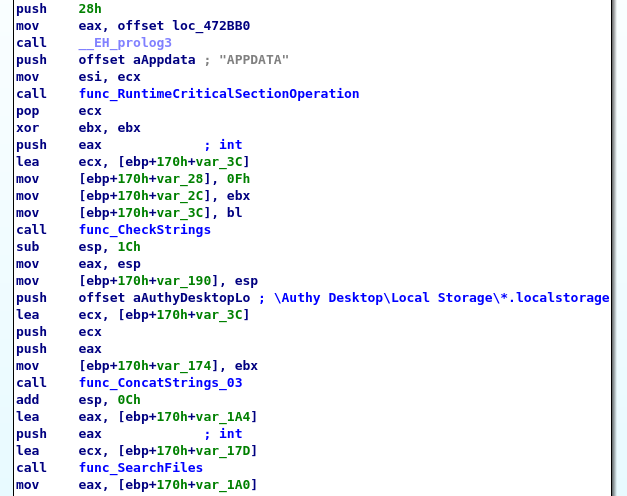
More specifically the SQLite file on the corresponding application on %APPDATA% repository. It looks like this is the same operating where stealer wants to steal data with software like Discord or Chrome.
So guys, be careful with your 2FA software :)
Browsers
Something interesting to mention, this bad boy is also stealing Tor Browser stuff.
List of supported Browsers
360 Browser
Amigo
BlackHawk
Cent Browser
Chedot Browser
Chromium
CocCoc
Comodo Dragon
Cyberfox
Elements Browser
Epic Privacy
Google Chrome
IceCat
Internet Explorer
K-Meleon
Kometa
Maxthon5
Microsoft Edge
Mozilla Firefox
Mustang Browser
Nichrome
Opera
Orbitum
Pale Moon
QIP Surf
QQ Browser
Sputnik
Suhba Browser
Tor Browser
Torch
URAN
Vivaldi
Waterfox
Of course, this list could be more important than this if there are some browsers based on chromium repository.
Messengers/Mailer
I will not explain here, how it works, but the technique is the same that I've explained in my previous blog post. (Especially for the Telegram part).
Bat!
Pidgin
Telegram
Thunderbird
Wallets
Anoncoin
BBQCoin
Bitcoin
DashCore
DevCoin
DigitalCoin
Electron Cash
ElectrumLTC
Ethereum
Exodus
FlorinCoin
FrancoCoin
JAXX
Litecoin
MultiDoge
TerraCoin
YACoin
Zcash
Of course, this list could change if the customer added some additional files to search on specific areas on the victim machine.
Grabber
The grabber feature is by far, the most complicated feature of the malware and what he looks to be really different from Arkei, in term of implementation.
So first of all, it will skip or not the grabber feature by checking in config file downloaded, if this is activated. Preparing the strings for creating the folder path and when all is set func_grabber could be used.
When inspecting the func_grabber, I was not prepared to have this :
By far, when I saw this, I was not really happy to reverse this. I mean, I know I was falling in some unexpected allocated memory into my brain. I had all the magnificent stuff that all malware reverser love (or not at all) :
Weird conditions come out the blue.
Calling function that will call other functions like Russian wooden dolls
API calls
etc...
But if we are watching these at a macro view, it's, in fact, easier than it looks like. I will just show just one example.
So in the example below, if the string %APPDATA% is present in the config downloaded from the C2. it will enter into the function and will start a bunch of verifications. Until entering into the most important one called func_VidarSearchFile
After the process will remain almost the same for each scenario.
This is at least, all the repositories available in the grabber feature :
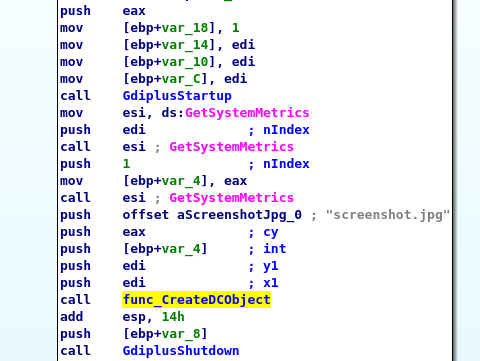
The generation of the screenshot is easy to understand :
First GdiplusStartup function is called to initialize the Windows GDI+
Then an alternative to GetDeviceCaps is called for getting the height of the screen on the display monitor with the value SM_CYSCREEN (1) with GetSystemMetrics this will be the same thing with SM_CXSCREEN (0) for the width.
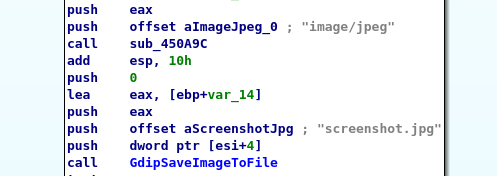
Now, it needs a DC object for creating a compatible bitmap necessary to generate our image by selecting the windows DC into the compatible memory DC and using a Bit Block API function to transfer the data. When all is done, it will enter into func_GdipSaveImageToFile
So now its needed to collect the bits from the generated bitmap and copies them into a buffer that will generate the screen capture file.
Information Log
So let's dig into information.txt, to understand how this file is generated. I will mention only some parts of the creation, another part will be just the corresponded API call, breakpoint on these API if you want to take your time to analyze all the step easily.
First, it indicates which version of Vidar is used.
If you don't see a Vidar on the log file. It means that you have an early version of it.
Get the name of the operating system and platform is classic because this is, in fact, a concatenation of two things. First, with RegOpenKeyExA, the value of this registry key is fetched:
For the current screen resolution used, CreateDCA is called to create a device context for "Display" and requesting the Width and Height of the Device with GetDeviceCaps.
This remains to this source code :
Network
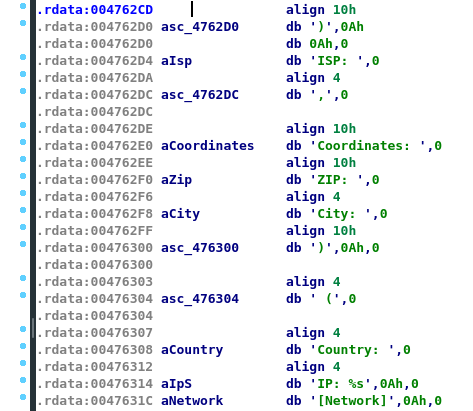
The network part is quite easy, it's a translation of data retrieves on ip-api.com/line/and put into the log, at the corresponding place.
Processes
There is quite soft stuff done to get a snapshot of all the processes at the time where the stealer is executed.
But in the end, this is not complicated at all to understand the different steps.
Results
So for example, if you want to see the results, let's see into one sandbox analysis, the generated information.txt (this is a Vidar 4.2 here)
Vidar Version: 4.2

Date: Thu Dec 13 14:39:05 2018
MachineID: 90059c37-1320-41a4-b58d-2b75a9850d2f
GUID: {e29ac6c0-7037-11de-816d-806e6f6e6963}

Path: C:\Users\admin\AppData\Local\Temp\toto.exe
Work Dir: C:\ProgramData\LDGQ3MM434V3HGAR2ZUK

Windows: Windows 7 Professional [x86]
Computer Name: USER-PC
User Name: admin
Display Resolution: 1280x720
Display Language: en-US
Keyboard Languages: English (United States)
Local Time: 13/12/2018 14:39:5
TimeZone: UTC-0

[Hardware]
Processor: Intel(R) Core(TM) i5-6400 CPU @ 2.70GHz
CPU Count: 4
RAM: 3583 MB
VideoCard: Standard VGA Graphics Adapter

[Network]
IP: 185.230.125.140
Country: Switzerland (CH)
City: Zurich (Zurich)
ZIP: 8010
Coordinates: 47.3769,8.54169
ISP: M247 Ltd (M247 Ltd)

[Processes]
- System [4]
---------- smss.exe [264]
- csrss.exe [344]
< ... >

[Software]
Adobe Flash Player 26 ActiveX [26.0.0.131]
Adobe Flash Player 26 NPAPI [26.0.0.131]
Adobe Flash Player 26 PPAPI [26.0.0.131]
< ... >
Loader
The task is rudimentary but enough to do the job :
Generating a random name for the downloaded payload
Download the payload
Execute
When the binary file is downloaded from the C2, it's using CreateFileA with specific parameters :
edi : The downloaded data from the C2
80h : "The file does not have other attributes set. This attribute is valid only if used alone."
2 : This option will force the overwriting if the filename already exists.
edi : ???
1 : "Enables subsequent open operations on a file or device to request read access."
Otherwise, other processes cannot open the file or device if they request read access."
40000000h : Write access (GENERIC_WRITE)
ebp+lpFileName : The generated filename
When it's done, it only needs to Write content into the files (WriteFile) and then close the corresponding handle (CloseHandle)
So now, the file is downloaded and saved into the disk, it only needs to be launched with ShellExecuteA. So don't hesitate to breakpoint this API function, for grabbing the payload before it's too late for further analysis.
Killing Part
So when all the task of the stealer is finally accomplished and cleaned, the stealer needs to erase itself. So first of all, it retrieves this own PID with the help of GetCurrentProcessId.
When it's done, it enters into "func_GetProcessIdName", tries to open a handle on his own process with OpenProcess, if it failed, it continues to check and in the end the most important task here is to call GetModuleBaseNameA, which it permits to retrieve the name of the process name with the help of the PID that was obtained before.
Some strings that are hardcoded on .rdata section are called and saved for future purposes.
When the request is finely crafted, Vidar is simply using ShellExecuteA to pop a command shell and executing the task, this permit to erase all trace of the interaction of the payload on the machine.
So if we want a quick overview of the executed command:
C:\Windows\System32\cmd.exe" /c taskkill /im vidar.exe /f & erase C:\Users\Pouet\AppData\Local\Temp\vidar.exe & exit
Literally:
Offset File + db'/c taskkill /im' + [GetModuleBaseNameA] + db' /f & erase' + [GetModuleFileNameExA + GetModuleBaseNameA]+ + db' & exit'
Sending archive to the C2
Folder generation
COUNTRY + "_" + Machine GUID + ".zip"
in example :
NG_d6836847-acf3-4cee-945d-10c9982b53d1.zip
Last POST request
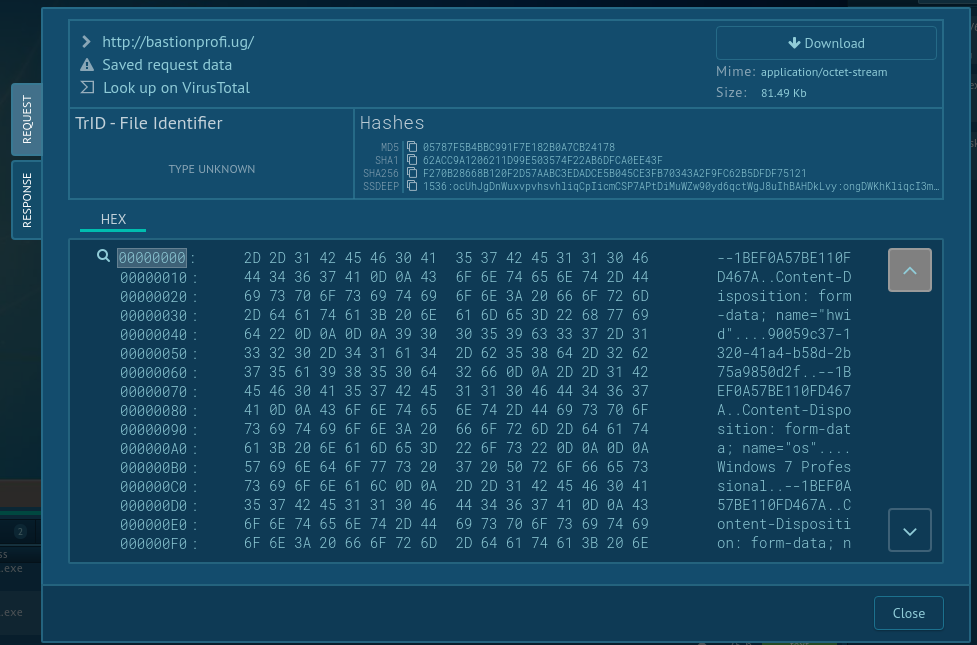
During the generation of the POST request, the generated HTTP packet is tweaked to add some additional content that the C2 server will read and process data.
Each name at the end of the string will be the corresponding field to be saved into the database. This at least, all the different Content-Disposition that will be added to the HTTP request.
hwid
Hardware ID
os
Operating System
platform
32 or 64 bits System
profile
C2 Profile ID
user
Name of the victim account
cccount
Number of Credit Cards stolen
ccount
Number of Coins Stolen (CryptoWallet)
fcount
Number of files stolen
telegram
Telegram :)
ver
The version of the Vidar malware
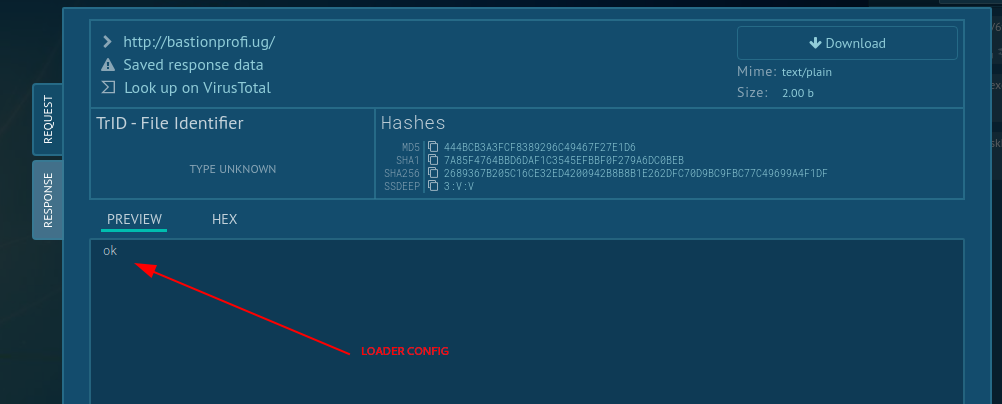
Also, there is a little trick here that I found nice. Here, the answer to the POST request is in fact, containing the config for the loader.
If there is nothing, the response is "ok"
If there is something, the specified url(s) are stored.
Its the same thing used for the config and the network information.
Example with a sandbox :
The POST request
The response of this POST request (select the tab)
Server-Side
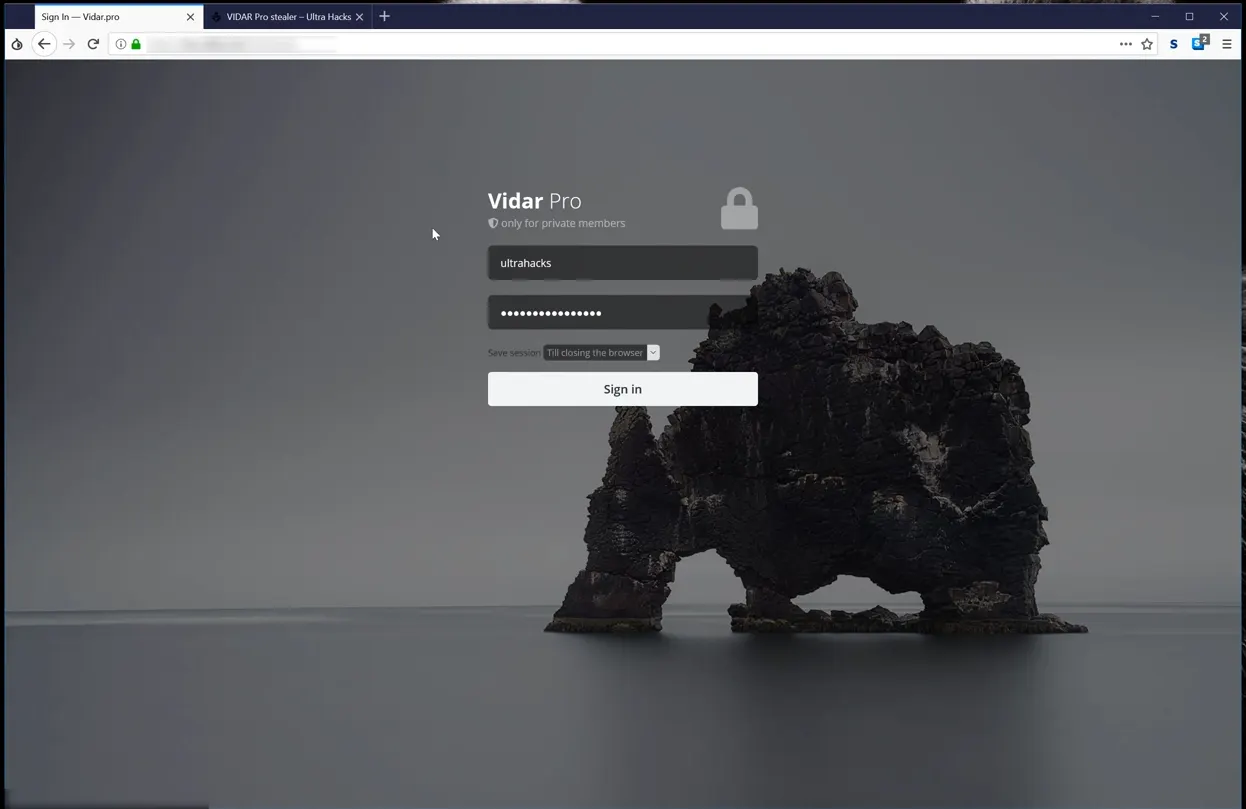
Because it's easy to find some information about the stealer, no needs to dig hard to have some marketplace where Vidar is sold. So let's see how it looks like by looking some classical commercial video (all the screenshot are collected from there), for attracting some possible customers. This could be completely different at that time, but it's what it was looking like at the beginning of November.
LoginDashboard
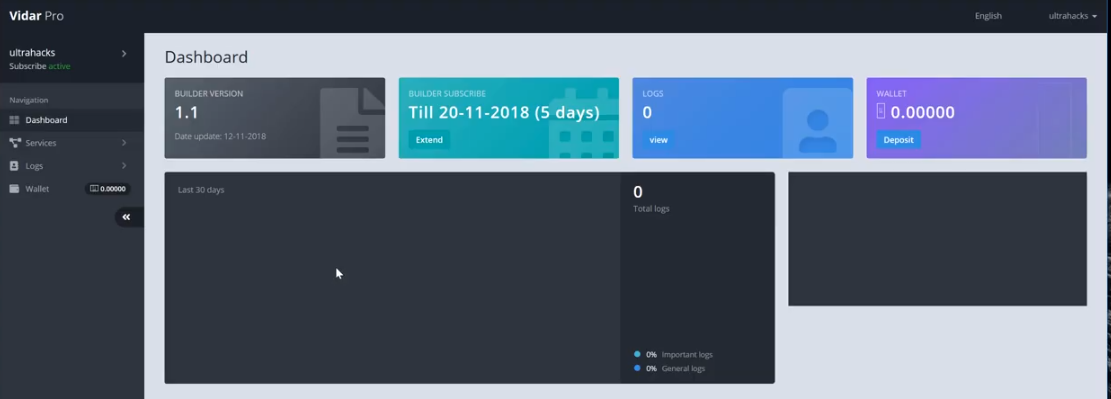
The panel is a classical fancy user-friendly interface, with all the basic information necessary for the customer to have a fast view how is goin' his business.
The current version of the builder
Until when he is able to generate some payloads
How many victims
The current balance on his account to re-subscribe again
Logs
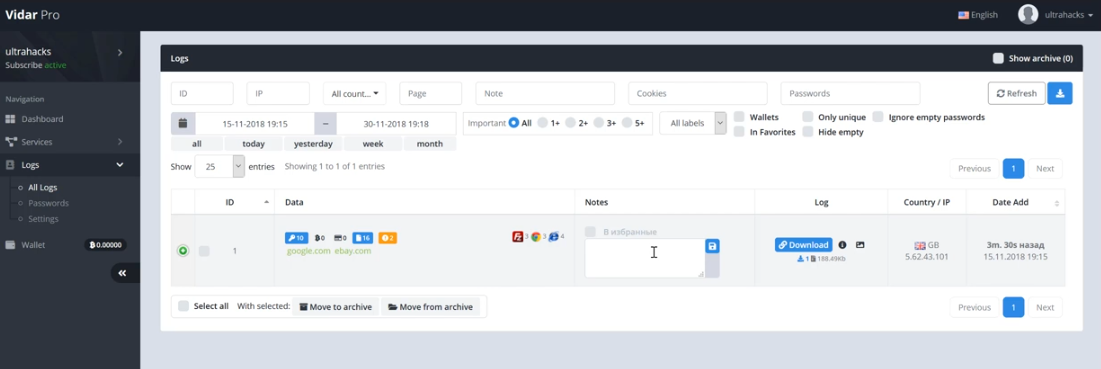
something to mention with the log part is that it's possible to put some notes on each data.
PasswordsBuilder
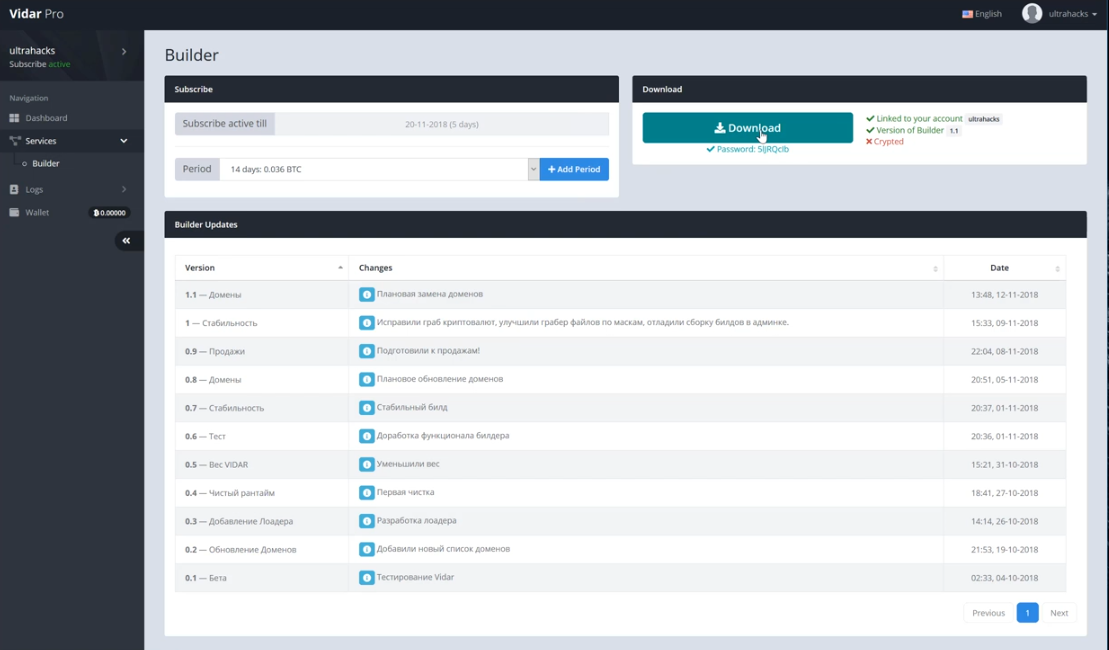
The builder tab is also pretty interesting because we have the changelog information about the stealer and on the download part, the malware generated will not be packed and this is the same scenario with Arkei.
Customer/Threat actor must have to use his own crypter/packer software for his payload.
Settings
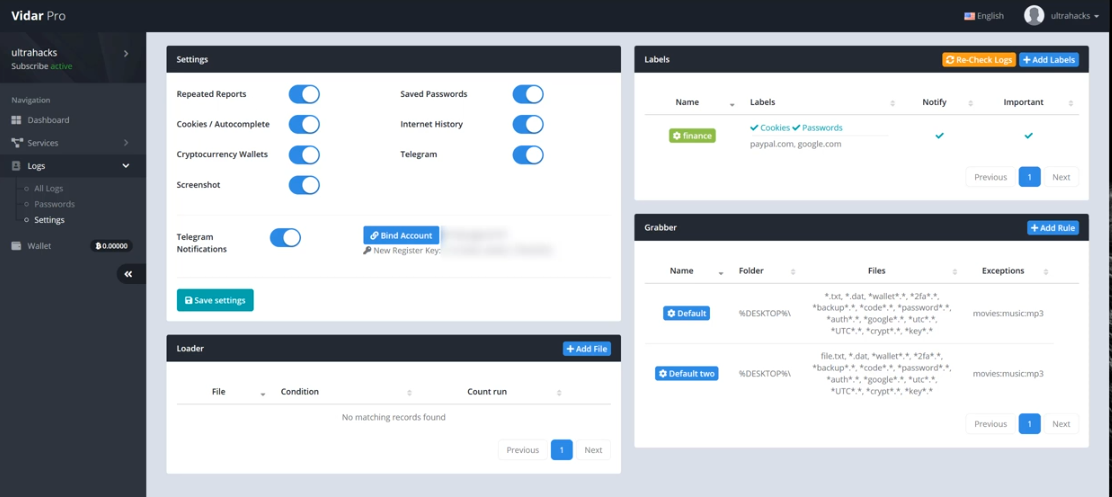
The most important tab is obviously where it is possible to configure the payload, for grabbing some additional stuff on the machine with the profiles. Activate or deactivate some features to filtering the stealer for really specific purposes.
It's also important to notify, that it's possible with Vidar to deploy multiple profiles at the same time. It means when the payload is infecting the victim machine, X archive for X profile is saved in "files" repository. The customer could be able to sort easily for malicious purposes after the grabbed data.
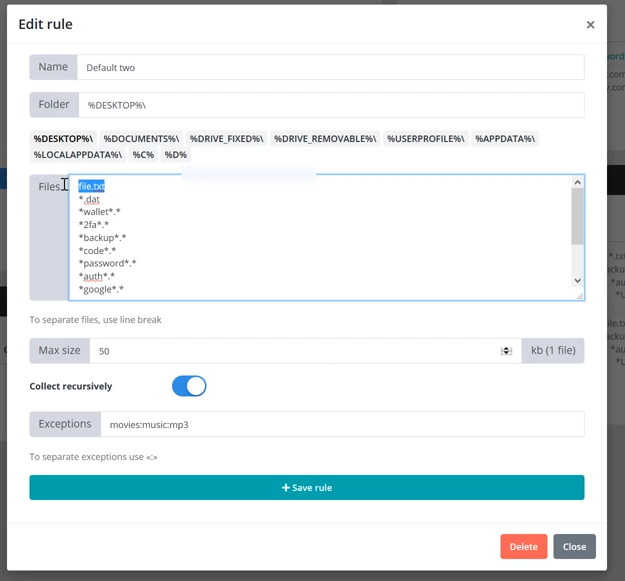
When editing or creating a new rule, we have this prompt panel appearing and this is in relation with what explained above with all possible path that the malware is able to search with the selected files.
After checking a little, there is plenty of profiles on the C2. This is what we could found:
Default empty config:
they are in fact Delimited with the specific format, as detailed as above. So here, we have 3 profiles :
DESKTOP
DOCUMENTS
DRIVE_REMOVABLE
that will be stored into there respectively archives into "files" repository.
e.d: All dumped profiles are available on my GitHub repository.
Finally, with this quick analysis of the panel, something that is more and more common nowadays with a stealer, a loader feature, for pushing other malware.
As mentioned in the introduction, this is a shop where customers will just have to deal to configure their malware, everything is managed by a team (?) behind for the maintenance and for avoiding proxy filtering stuff, domains are changed regularly (it's also easy to check this on the samples, because it looks like a new version means a new generated domain).
Also, there is some possibility (of what they said) to have a 2FA Authentication to their account page.
Some fancy message
if we are searching for some stuff with the login panel, with have some sympathetic message.
Let's see what we have behind :)
A kind of easter egg to remind us what is the signification of Vidar: "the God of Vengeance" in Nordic mythology.
Vidar - An Arkei copycat?
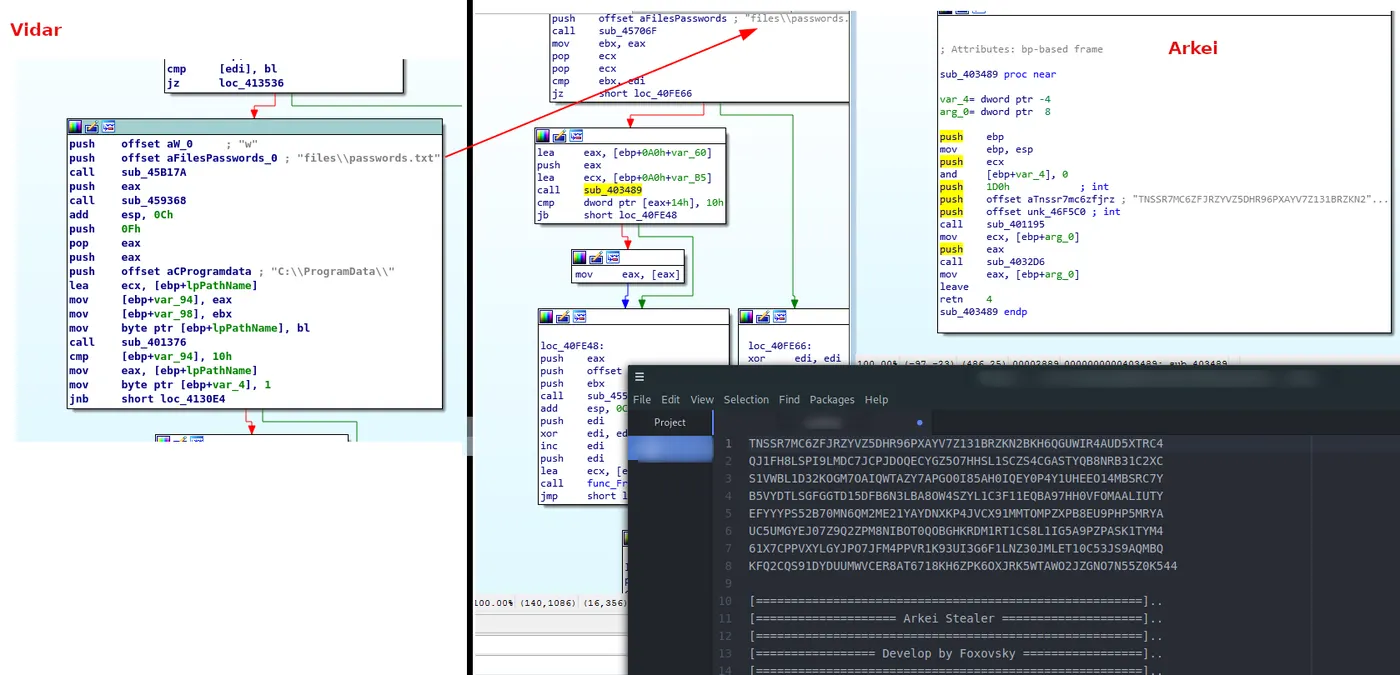
If we are looking to requests and code, Vidar is almost identical to Arkei. There is slightly some differences at some point but all implemented features are the same. This could lose some blue team people if they don't make too much attention to it on sandbox results. Current Yara rules will trigger Vidar as Arkei, so automated assignations lead to mistakes at the moment of this review. Analyzing the code is mandatory here to understand what's goin' on.
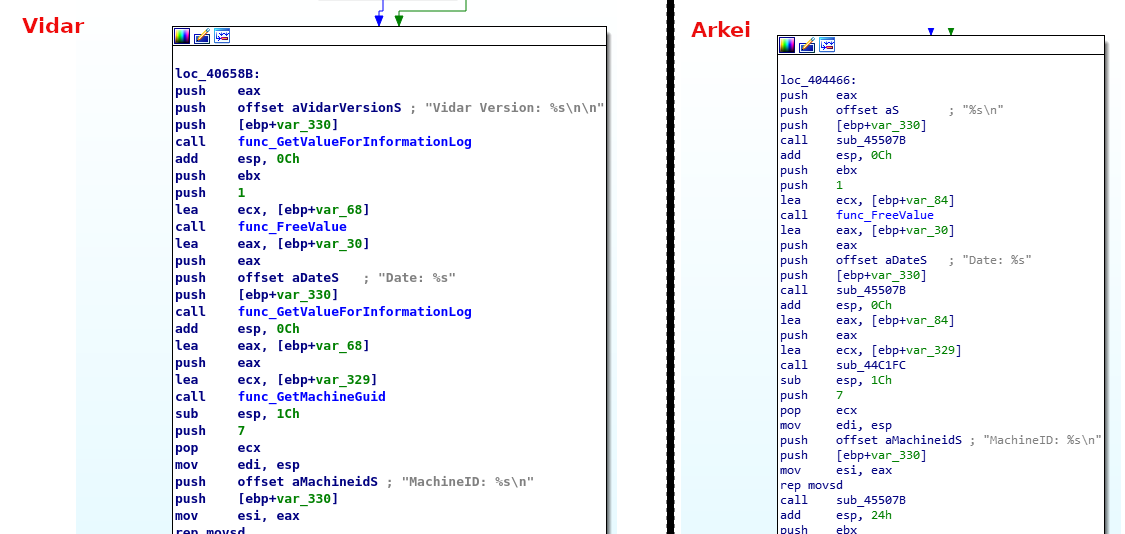
At first, the main function for both of them is similar :
The archive generation is also the same, so this is not with this information that it's possible to differentiate these two malware.
Code differences
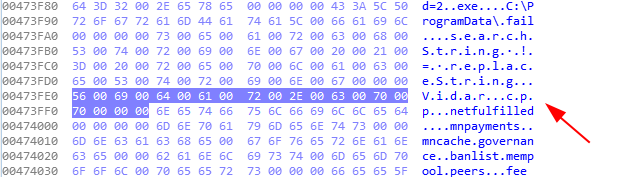
An easy to know if we are dealing with Vidar is to find "Vidar.cpp".
Vidar SignatureArkei signature
Network differences
An analyst can be dupe easily with the requests and thinking that we have another form of HTTP requests with Arkei, but it's not.
Vidar HTTP Requests
there are no libraries downloaded on Arkei, this is something really specific to Vidar, for some parts of the stealing process.
Arkei HTTP Requests
/index.php        <- Config
ip-api.com/line/  <- Get Network Info
/index.php        <- Pushing Victim Archive to C2
Config Format
If you want to understand what is the purpose the config format for Arkei
1
Saved Passwords
1
Cookies / Autofill
1
History
2
CryptoCurrency
2
Skype
2
Steam
1
Telegram
1
Screenshot
1
Grabber
txt:log:
Grabber Config
50
Max Size (kb)
2
Self Delete
Also, there are some slight changes in the last POST requests, Vidar is just adding new fields like the profile and the versioning.
To understand how far the requests looks the same, let's dig into a PCAP file. I indicated the differences in red, and apart from the versioning and profile values, all rest is the same. But if we dig into some older sample, it's impossible to see the differences except the path of the request.
Last POST request - Vidar
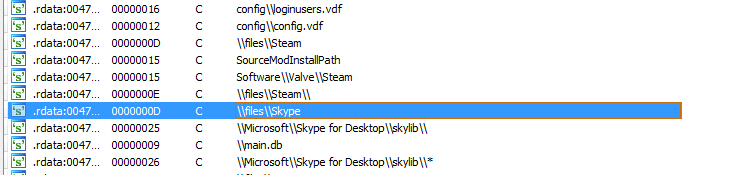
When we dig into the different features, there is some config part on Vidar that is in fact just some placebo options. in an example, the Steam stealing feature is implemented in Arkei is not found in Vidar. This is also the same thing with Skype but in contrary 2FA stealing stuff is only on Vidar (with what I have seen on samples in my possession).Strings only present in Arkei and not in the Vidar that I analyzed
Is Arkei still active and maintained?
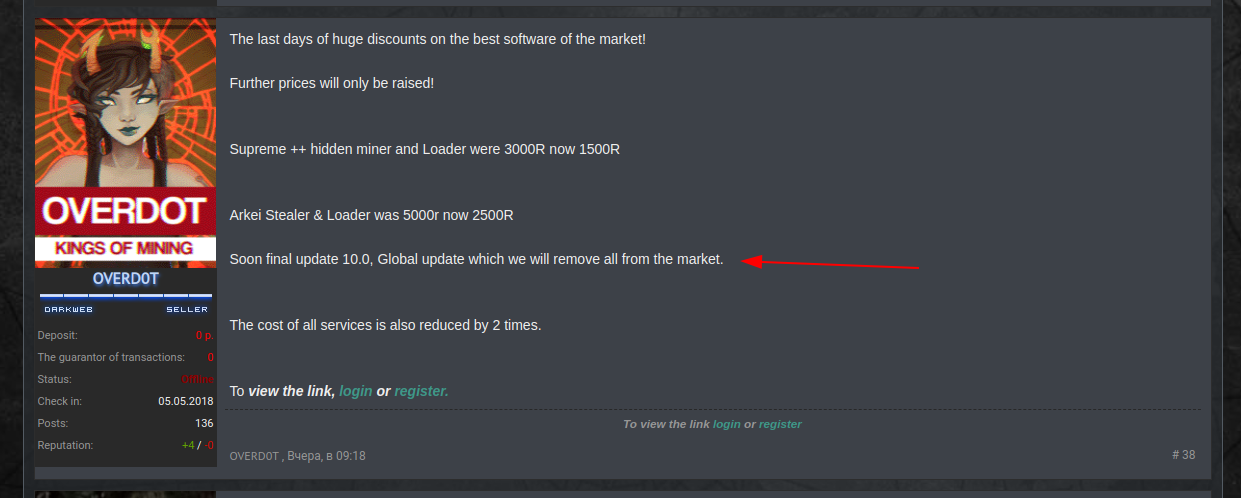
On one of the selling page of this stealer, it's still sold and continue to be updated. For example, it reveals that soon a final update on it will be pushed (v10). So let's see how this will turn.
The Vidar Cracked Version
There is also in the wild a cracked version that was already spotted by some people on twitter. This Vidar or "Anti-Vidar" as called in the source code of the panel and It's based on an early Vidar build (v2.3 it seems).
Login
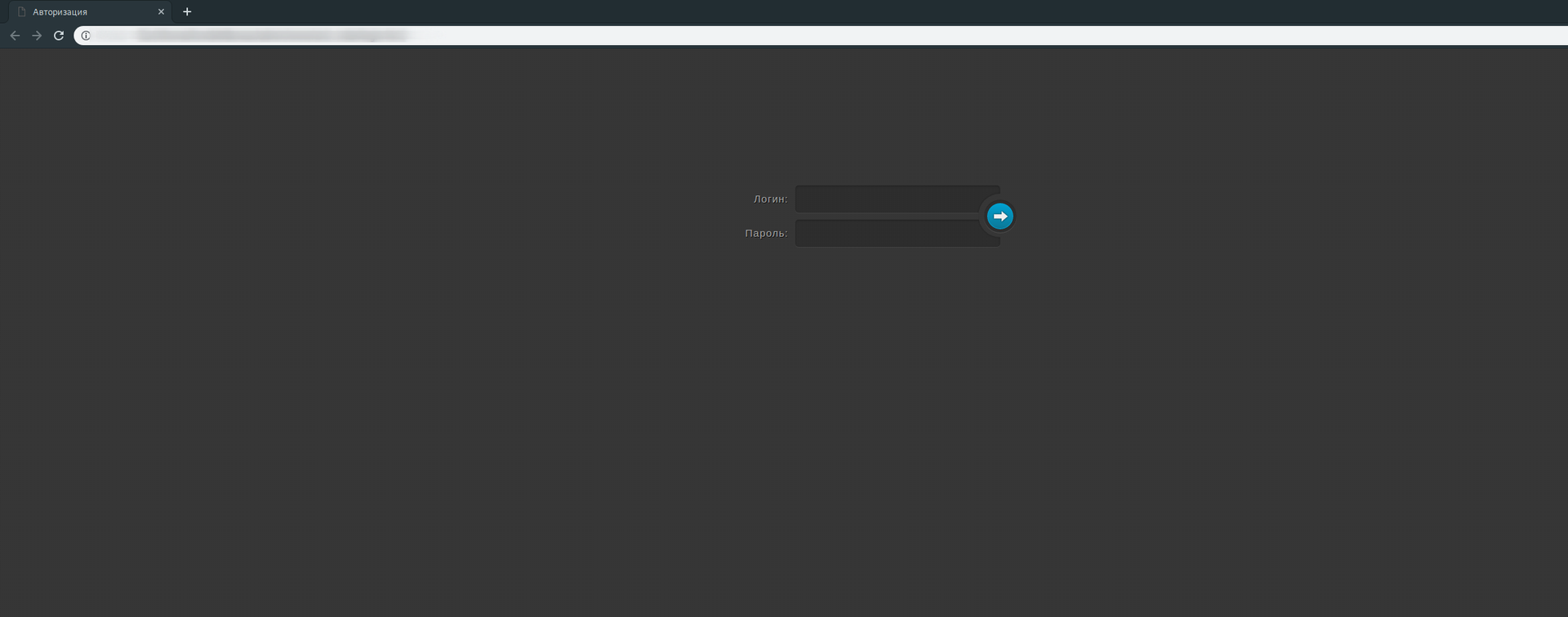
The login is identical to the Android Lokibot panel (thanks to @siri_urz). As always when confronted at this kind of stuff, the code never lies (or it seems) for helping us to identify what is the real C2/Malware.
Profile code
The profile is far more simple than the nowadays panels and samples, the default profile is hardcoded on the PHP file, and will get it if the value is 11.
This is, as usual, the same thing that I said about my precedent blog post.
Always running stuff inside a VM, be sure to install a lot of stuff linked to the hypervisor (like Guest Addons tools) to trigger as much as possible all kind of possible Anti-VM detection and closing malware.
When you have done with your activities stop the VM and restore it with a Specific clean snapshot.
Avoid storing files at a pre-destined path (Desktop, Documents, Downloads), put at a place that is not common.
Don't be stupid to click on cracks on youtube, hack software for popular games, or "wonderful" easy cash money (like Free Bitcoin Program /facepalm).
Flush your browser after each visit, never saved your passwords directly on your browser or using auto-fill features.
Don't use the same password for all your websites (use 2FA and it's possible).
Conclusion
This analysis was a kind of a mystery game. It's hard to understand if Vidar is an evolution of Arkei or a forked malware based on his code. As far it seems this is currently an active one and growing up. A lot of updates are pushed on it regularly probably due because this is a young (forked/copycat) malware. With the fact, that this stealer was also using the skin theme of Android Lokibot (due to the cracked version), this could really lose some minds for identifying what is the correct name of the C2, without any samples to analyze. For now, let's see with the time if we will more answers to put the puzzle together for this stealer. ¯\_(ツ)_/¯
On my side, if I could sum up this year. I have done way more things than I could imagine because 2018 was a really "reaaalllyyyy" thought year, with a lot of problems and huge issues. Let's see how this next year will be. But now, it's time to rest and eat because there were so many sleep hours destroy and skip meals this year for learning stuff.
Special thanks to my buddies (they will know who they are), you are the best <3
#HappyHunting
#SeeYouIn2019

 As explained in the MSDN, A "locale" is a collection of language-related user preference information represented as a list of values, the stealer will check if the language is corresponding with the list of countries that mentioned below.
 With a few seconds of searching on google, it's easy to understand which countries are behind the locale names :
 When it's done, the mutex is created, just like this :

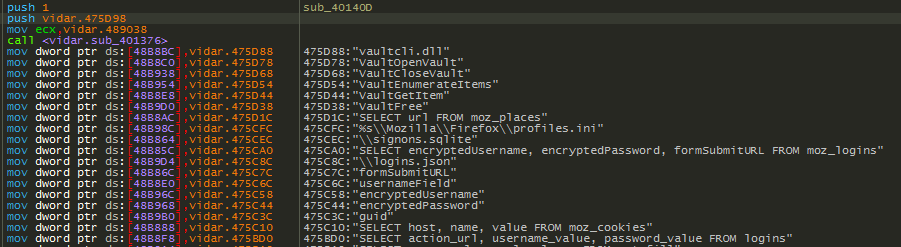 All the RVA address of each string are stored in the .data section. The malware will go there to access to the requested string.
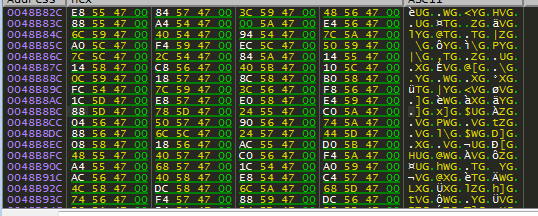 This is a trick to slow down the static analysis of the malware, but this is really easy to surpass :)
 The C2 domain is a simple XORed string, the key is directly put into the XOR function to decrypt the data.
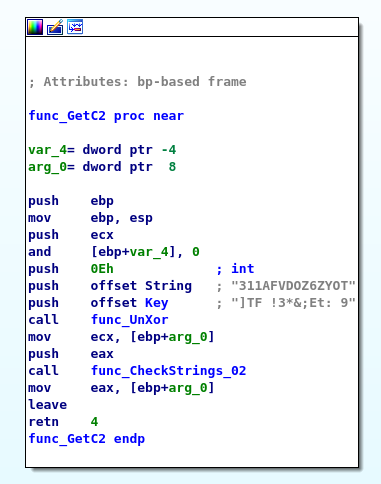 And decrypted it's in fact "newagenias.com"
 Configs are possible to be extracted easily with the script izanami.py on my GitHub repository.
 And for this case, they are required during the stealing process of different kind of browsers.
 More specifically the SQLite file on the corresponding application on %APPDATA% repository. It looks like this is the same operating where stealer wants to steal data with software like Discord or Chrome.
 So guys, be careful with your 2FA software :)
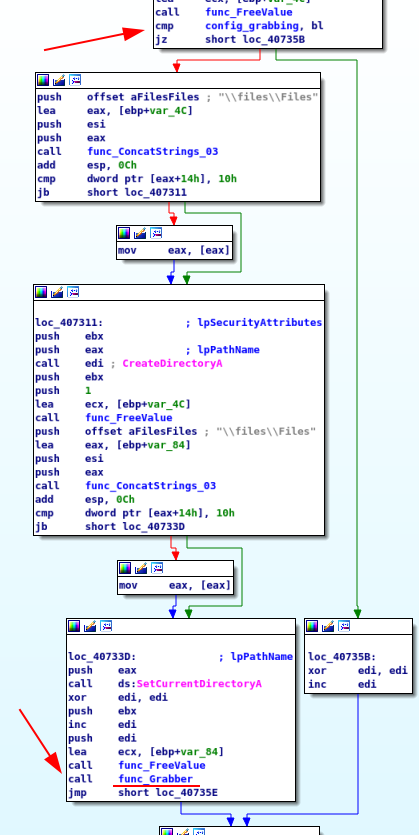 When inspecting the func_grabber, I was not prepared to have this :
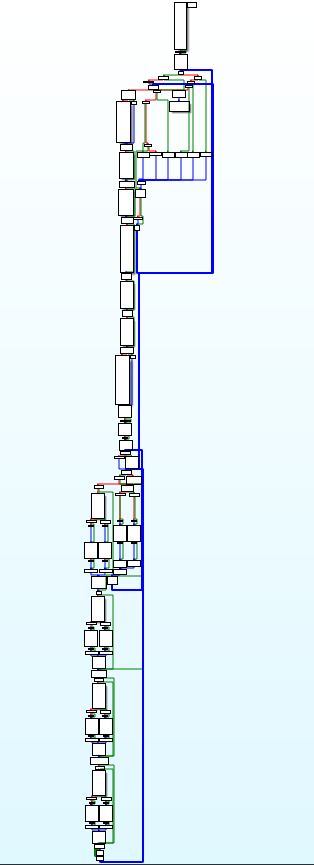 By far, when I saw this, I was not really happy to reverse this. I mean, I know I was falling in some unexpected allocated memory into my brain. I had all the magnificent stuff that all malware reverser love (or not at all) :
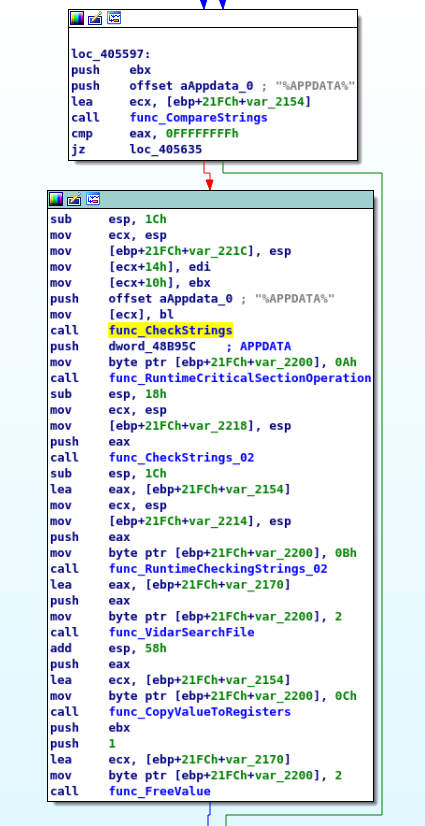 After the process will remain almost the same for each scenario.
This is at least, all the repositories available in the grabber feature :
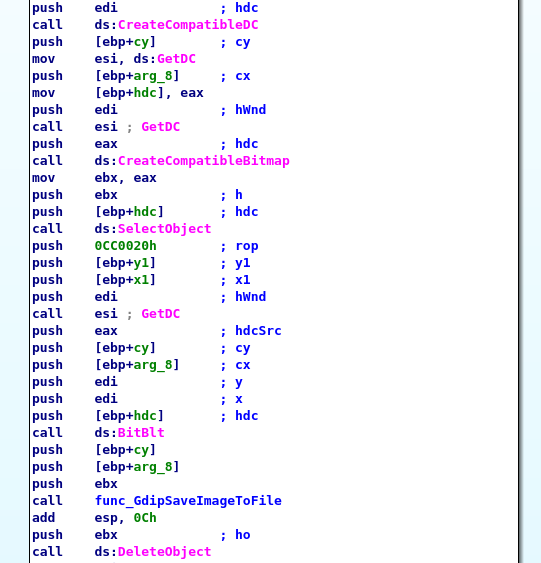 So now its needed to collect the bits from the generated bitmap and copies them into a buffer that will generate the screen capture file.
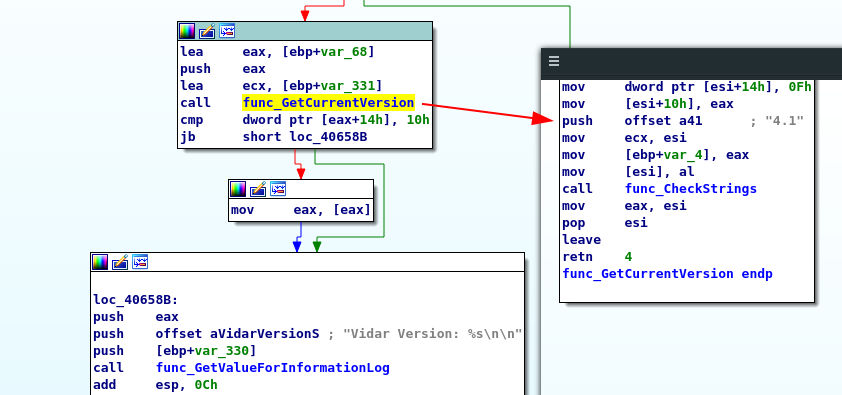 If you don't see a Vidar on the log file. It means that you have an early version of it.
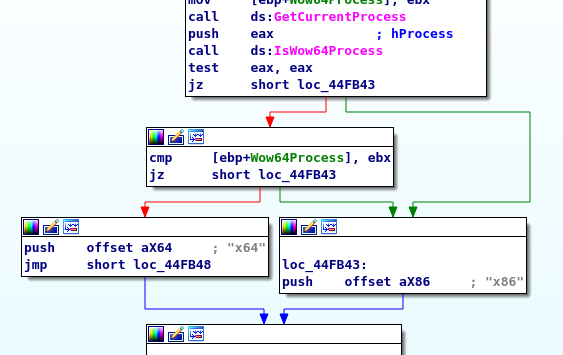
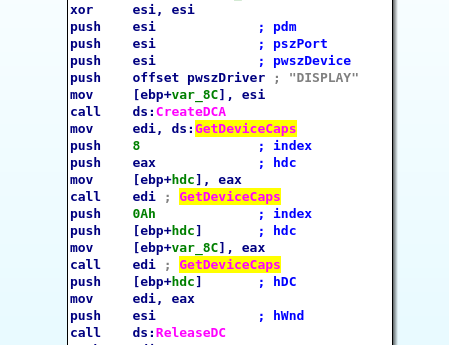 This remains to this source code :
 Processes
There is quite soft stuff done to get a snapshot of all the processes at the time where the stealer is executed.
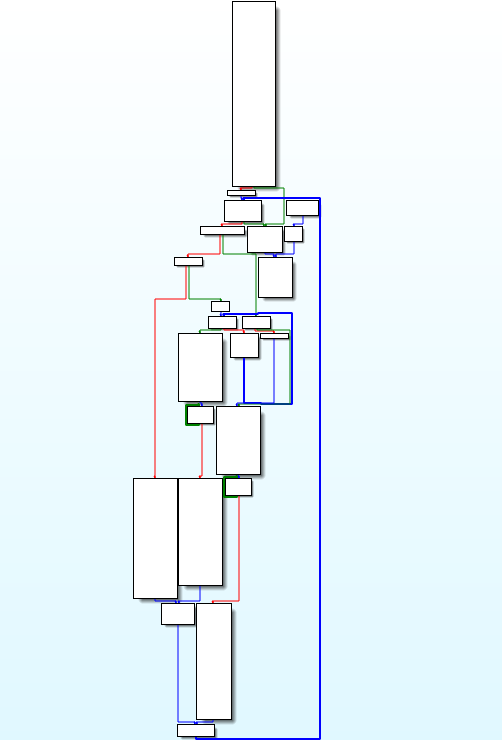 But in the end, this is not complicated at all to understand the different steps.
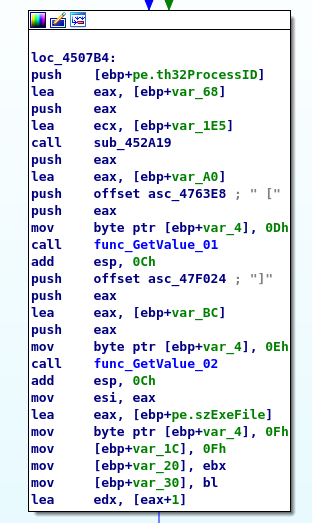
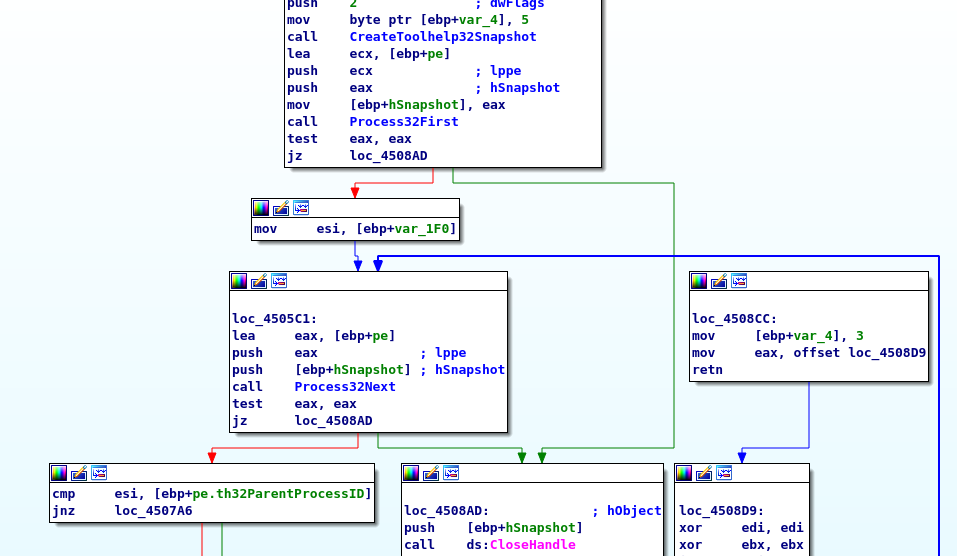 After, checking if it's a parent process or a child process, Vidar will grab two value of the PROCESSENTRY32 object :
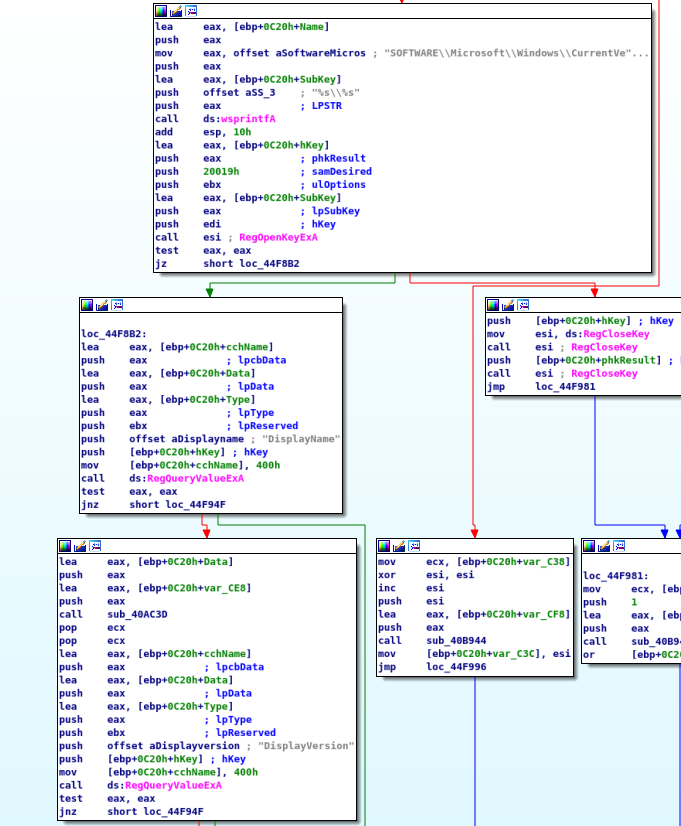
 Software
For the list of all installed software, the value of this registry key is fetched:
 Results
So for example, if you want to see the results, let's see into one sandbox analysis, the generated information.txt (this is a Vidar 4.2 here)
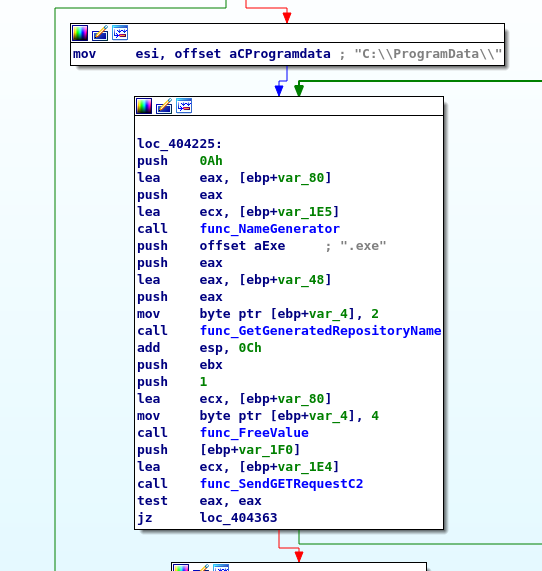 When the binary file is downloaded from the C2, it's using CreateFileA with specific parameters :
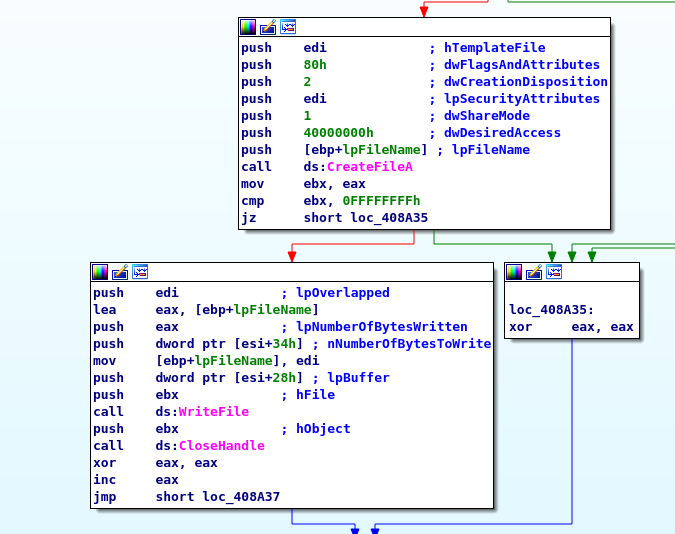 So now, the file is downloaded and saved into the disk, it only needs to be launched with ShellExecuteA. So don't hesitate to breakpoint this API function, for grabbing the payload before it's too late for further analysis.
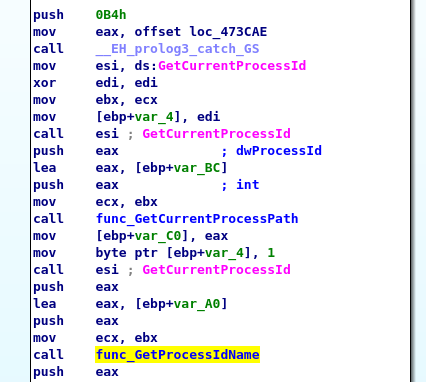 When it's done, it enters into "func_GetProcessIdName", tries to open a handle on his own process with OpenProcess, if it failed, it continues to check and in the end the most important task here is to call GetModuleBaseNameA, which it permits to retrieve the name of the process name with the help of the PID that was obtained before.
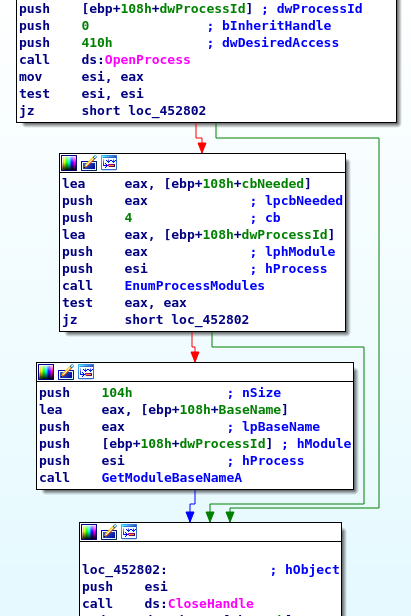 Some strings that are hardcoded on .rdata section are called and saved for future purposes.
 When the request is finely crafted, Vidar is simply using ShellExecuteA to pop a command shell and executing the task, this permit to erase all trace of the interaction of the payload on the machine.
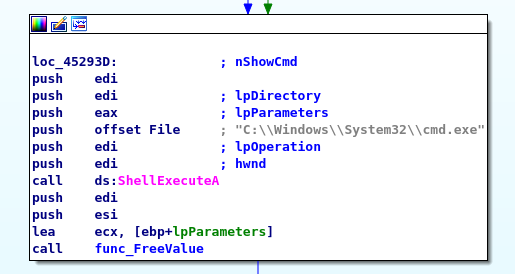 So if we want a quick overview of the executed command:
C:\Windows\System32\cmd.exe" /c taskkill /im vidar.exe /f & erase C:\Users\Pouet\AppData\Local\Temp\vidar.exe & exit
Literally:
Offset File + db '/c taskkill /im' + [GetModuleBaseNameA] + db ' /f & erase' + [GetModuleFileNameExA + GetModuleBaseNameA]+ + db ' & exit'
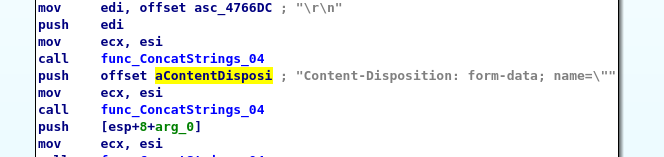 Each name at the end of the string will be the corresponding field to be saved into the database. This at least, all the different Content-Disposition that will be added to the HTTP request.
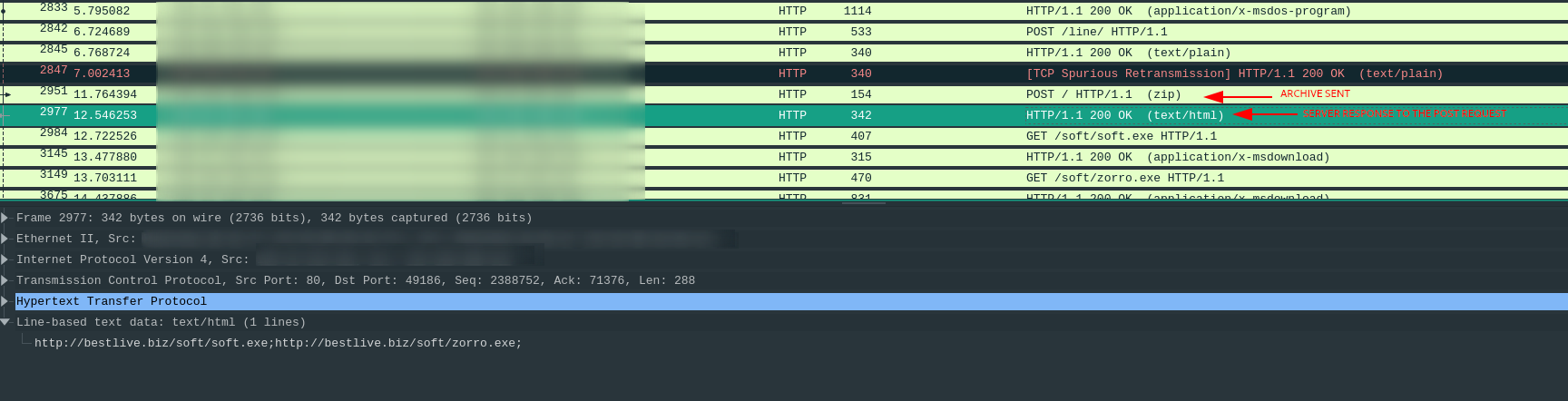 Its the same thing used for the config and the network information.
Example with a sandbox :
 Dashboard
The panel is a classical fancy user-friendly interface, with all the basic information necessary for the customer to have a fast view how is goin' his business.
 Logs
something to mention with the log part is that it's possible to put some notes on each data.
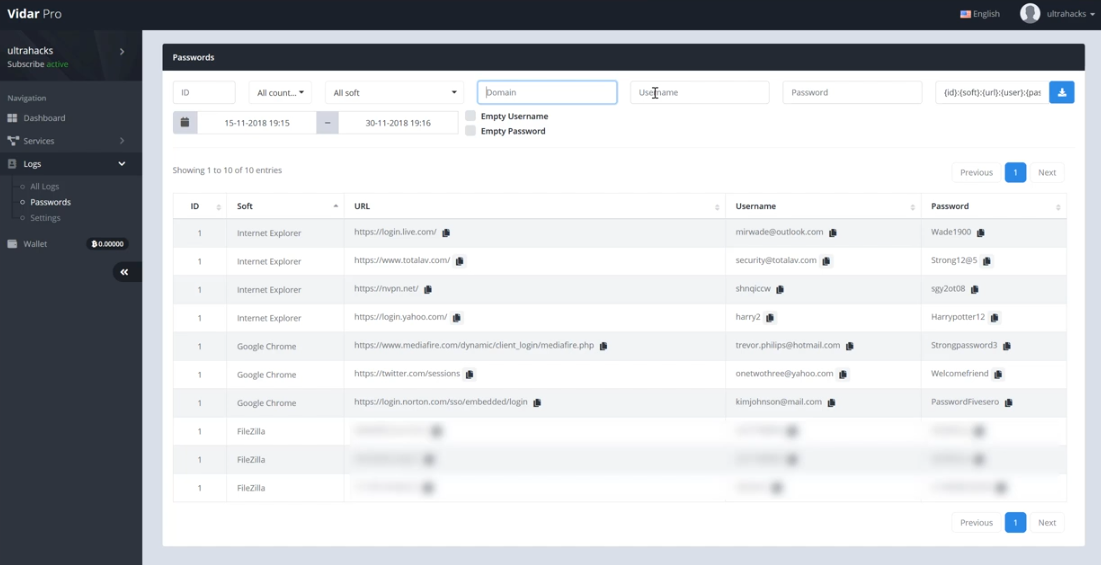
 Passwords
 Builder
The builder tab is also pretty interesting because we have the changelog information about the stealer and on the download part, the malware generated will not be packed and this is the same scenario with Arkei.
Customer/Threat actor must have to use his own crypter/packer software for his payload.
 Settings
The most important tab is obviously where it is possible to configure the payload, for grabbing some additional stuff on the machine with the profiles. Activate or deactivate some features to filtering the stealer for really specific purposes.
It's also important to notify, that it's possible with Vidar to deploy multiple profiles at the same time. It means when the payload is infecting the victim machine, X archive for X profile is saved in "files" repository. The customer could be able to sort easily for malicious purposes after the grabbed data.
 When editing or creating a new rule, we have this prompt panel appearing and this is in relation with what explained above with all possible path that the malware is able to search with the selected files.
 After checking a little, there is plenty of profiles on the C2. This is what we could found:
Default empty config:
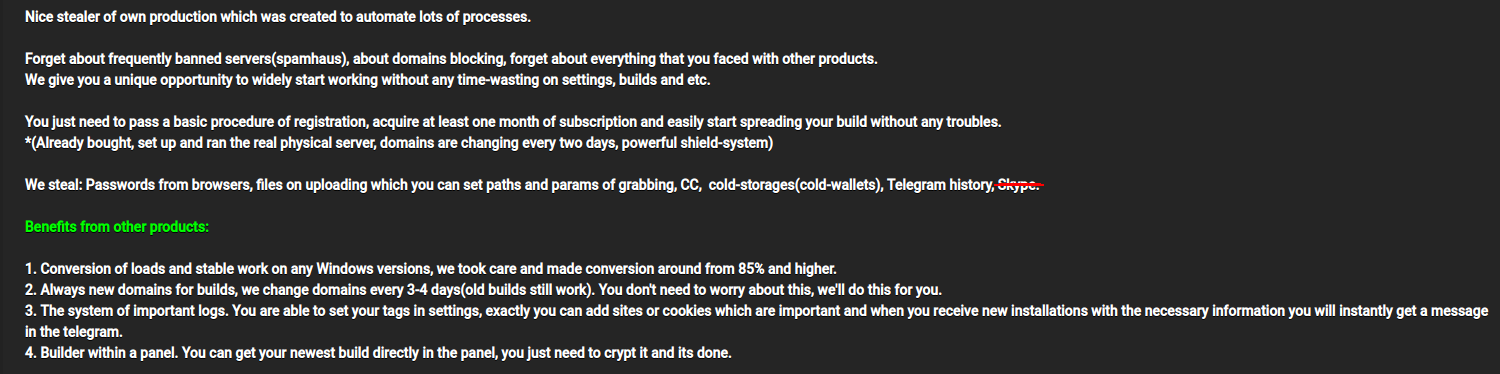 Also, there is some possibility (of what they said) to have a 2FA Authentication to their account page.
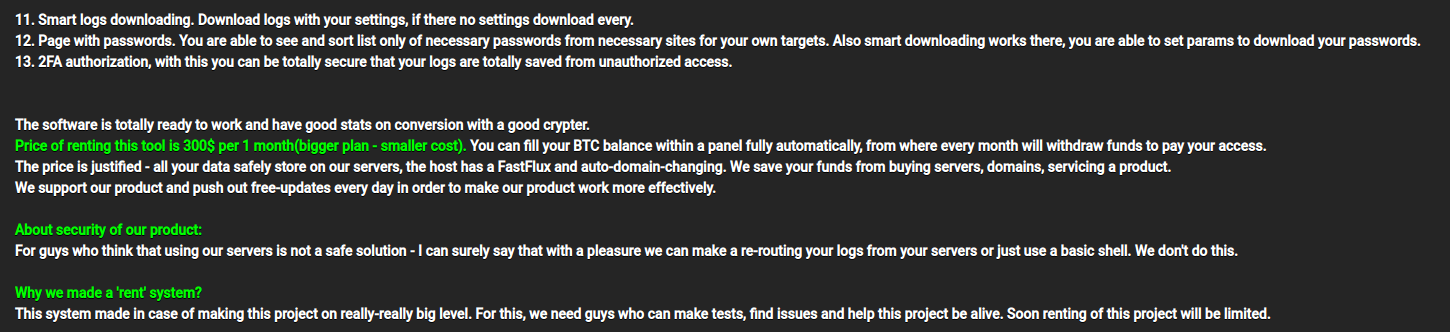
 Let's see what we have behind :)
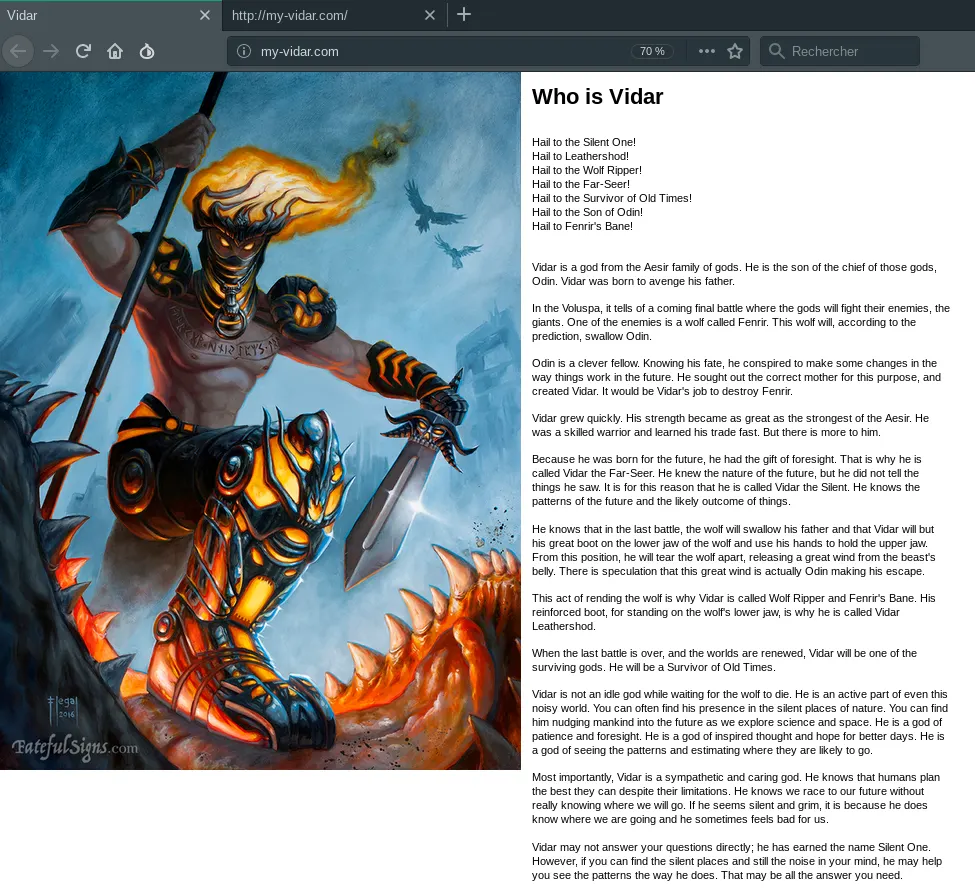 A kind of easter egg to remind us what is the signification of Vidar: "the God of Vengeance" in Nordic mythology.
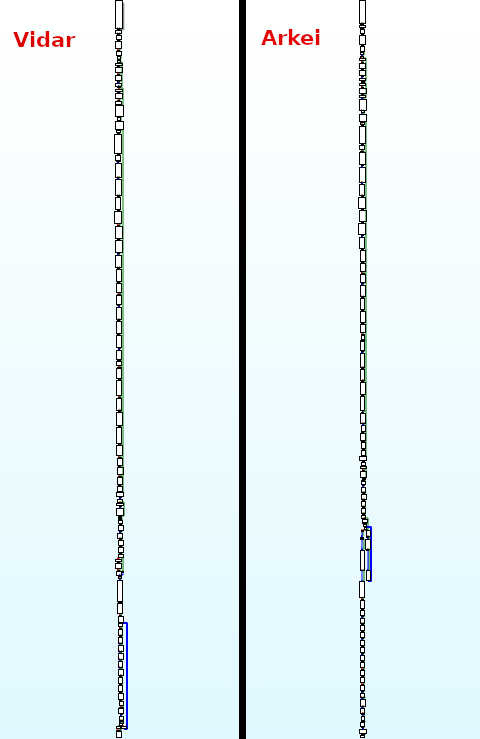 The archive generation is also the same, so this is not with this information that it's possible to differentiate these two malware.
 Vidar Signature
 Arkei signature
 If you want to understand what is the purpose the config format for Arkei
 Profile code
The profile is far more simple than the nowadays panels and samples, the default profile is hardcoded on the PHP file, and will get it if the value is 11.
 #HappyHunting
#SeeYouIn2019